I. Why Do People Find Certain Things Beautiful?
An old saying goes: everyone has a heart that loves beauty. But how many people have actually thought about why humans have concepts of beauty and ugliness, why people find some things beautiful and others ugly?
1.1 Beauty Does Not Come from a Single Source
Beauty is not a single-source judgment. It may come simultaneously from the collective memory accumulated by our ancestors’ evolution, what Jungian psychology calls the collective unconscious, as well as from visual processing, cultural experience, and personal memory.
Evolutionary level: some sense of beauty may relate to survival, reproduction, safety, and resource assessment, such as healthy faces, clear water sources (clear water is actually not necessarily safe, I remember a few years ago some tourists apparently ended up hospitalized after drinking lake water), and open vistas. These can all unconsciously evoke associations with vitality, safety, and habitability.
Visual processing level: the brain prefers information that is easy to process. Symmetrical, clear, stable, regular things are easier for the brain to understand, and therefore easier to judge as comfortable, natural, and good-looking.
Cultural experience level: different cultures shape different aesthetic standards, such as Western churches and Chinese temples. Certain patterns, architectural styles, and clothing carry different meanings in different societies.
Personal memory: the environment a person loved in childhood, familiar objects, important people and experiences, will all influence their aesthetic judgment.
1.2 Facial Attractiveness
The attractiveness of faces may come from our ancestors’ sensitivity to health, developmental stability, and vitality.
From the perspective of evolutionary psychology, human judgment of facial beauty may be related to cues such as averageness, symmetry, and perceived health. But this does not mean “beauty equals good genes” — it’s only that the brain may treat certain external features as shortcuts for quick judgment. And this judgment process is often undetectable, because we usually can’t perceive our own subconscious. Conscious information processing is only about 10 bits per second, while the subconscious (more precisely, the processing speed of the sensory systems) can reach roughly 10^9 bits/s, nearly a hundred million times faster than consciousness.
Before consciousness forms a judgment, the sensory systems and unconscious processing have already done massive filtering, compression, and pre-judgment. Very often, when we enter a place and suddenly feel “unsafe,” “uncomfortable,” or “something’s off,” it may not be mysticism, but the brain picking up information at an unconscious level — light, space, sound, the state of the crowd — information that simply hasn’t been clearly translated into language yet.
1.3 Natural Landscapes: The Safe Habitat Preference
The reason beautiful natural landscapes make us feel beauty may be related to our ancestors’ preference for safe habitats.
Humans do not like natural scenery randomly. Open vistas mean opportunities and dangers are easier to spot, water means resources, and trees and shelter mean safety. In a classic 1984 study by Ulrich on hospital window views, it was found that post-operative patients who could see natural landscapes, compared with patients facing brick walls, had shorter recovery times and used fewer strong painkillers.
This doesn’t mean beautiful scenery can cure disease, only that natural environments affect human hormones, and thereby mood (at first I actually planned to put mood before hormones, but that somewhat reverses cause and effect). It shows that people react to the sense of safety, openness, and vitality in an environment.
So when we find a natural landscape beautiful, it may not just be because it looks good, but because at a subconscious or unconscious level it implies resources, safety, and vitality.
1.4 The Beauty of Interfaces: Processing Fluency
The beauty of faces and landscapes generally comes from evolution and culture. The beauty in interfaces, however, comes largely from one important concept: “processing fluency.”
Let me give the definition of processing fluency first: the easier an interface is for the brain to process, the more easily people develop positive feelings toward it.
If an interface has many elements, chaotic colors, inconsistent button styles, and vague copy, users have to constantly spend attention understanding the interface. Even if the functionality itself has no real problems, users may develop aversion and feel the thing is complicated and hard to use. Gestalt psychology also covers this, regarding how users automatically organize visual information.
II. Gestalt Psychology
Gestalt psychology holds one very important view: the whole is not a simple sum of its parts.
This sounds a bit like the concept of emergence — the whole is greater than the sum of its parts, and that extra part is emergence.
We actually look at interfaces the same way, not reading every button, image, piece of text, or icon one by one. The human brain automatically seeks structure, seeing nearby elements as one group, similar elements as one category, content wrapped in borders as the same region, and incomplete shapes as completed forms.
Perhaps this is also why humans struggle to spot camouflaged animals in green foliage — the brain looks by region, performing a kind of visual organization. (I originally wanted to give two examples here about green foliage, but on second thought those two examples might be a bit scary.)
This is very important for design: the process of a user understanding an interface starts with the first step of visual organization.
There are several principles in Gestalt psychology:
- Proximity
- Similarity
- Common Region
- Closure
- The Law of Prägnanz: complexity is not the problem, disorder is
2.1 Proximity
The principle of proximity means that elements visually closer together are perceived as more closely related; elements farther apart are more likely to be seen as belonging to different groups.
For example, in a form, if the username label is too far from the input box, the user has to spend extra effort figuring out which input box that label corresponds to. Conversely, if the label, the input box, and the hint text are close to each other, the user quickly understands they belong to the same operational unit.
So in design, related elements should be placed close together, and unrelated elements should be spread apart.
The key point of the principle of proximity is that spacing is not decoration, it expresses relationships.
2.2 Similarity: Look Alike, and It’s Assumed to Do Alike
The principle of similarity means: elements with similar appearances are perceived by users as having similar functions or belonging to the same category.
If several buttons share the same color, shape, and size, users will naturally take them as the same kind of operation. Conversely, if one button uses a completely different color, users will naturally take it to represent a different type of operation.
So in interface design, button styles, icon styles, font sizes, and color rules cannot be changed arbitrarily — every change is sending a signal to the user.
So ordinary operations like save, cancel, and go back are generally styled consistently, but a high-risk operation like deleting your account should be clearly distinguished from ordinary buttons.
The key point of the principle of similarity is: consistent styles help users build rules, and if styles are going to change, there should be a clear reason.
2.3 Common Region: Framed Together Means the Same Group
The principle of common region means: elements wrapped by the same border, card, color block, or background area are perceived by users as belonging to the same functional group.
So cards are used very often in interface design now. Cards aren’t just for looking good, they’re also telling the user:
This block of content belongs to the same theme. The buttons, text, and images inside are related.
Codex also frequently uses cards when writing front-end code — one block on the left, one on the right — but Codex’s cards are generally quite large, and the font size and line spacing inside are also large. Codex by default likes that kind of thick, hard-looking font, which doesn’t suit my taste at all, so later I made myself a skill.
Of course, take an even simpler example: a product card contains the product image, product name, price, and buy button, but obviously you don’t treat these as independent objects, you understand it as “this is a product.”
But common region must not be used carelessly. If an interface has borders, color blocks, and cards everywhere, the user may not know where the focus is. Too many regions and the visual space becomes fragmented noise.
The core message of the principle of common region is: boundaries help understanding, but too many boundaries create chaos.
2.4 Closure: The Brain Actively Fills in Missing Information
The human brain tends to actively complete an incomplete shape and see it as a whole. So some brand logos choose not to draw all their boundaries — say a circle missing a small segment, and people still understand it as a circle.
The value of closure is that it can make a design more concise. Sometimes moderate blanking-out and omission instead create a special memory point for the user.
But the prerequisite of the closure principle is that the shape to be closed must be very simple. If too much is missing — say a circle missing 99.9% of itself, that’s basically a straight line, what is there left to complete?
The principle of closure tells us: omission can create beauty, but the user must be able to complete it.
2.5 The Law of Prägnanz: Complexity Is Not the Problem, Disorder Is
There is another very important idea in Gestalt psychology: the human brain tends to organize complex information into simpler, more stable, more regular forms.
This doesn’t mean people only like minimalism. It means the brain prefers things with patterns. Some buildings, though very complex with many constituent parts, form a distinctive kind of beauty. For example, many medieval European cathedrals contain a great deal of richly colorful visual elements, but they aren’t randomly piled up; instead, order is created through repetition and symmetry. The human brain greatly enjoys the feeling of finding patterns within complexity, and so beauty can emerge — on the premise that the brain can discover the underlying regularity.
Processing fluency theory agrees: the more easily an object is processed, the more easily it produces a positive aesthetic response.
So users aren’t actually afraid of complexity; they’re afraid of complexity without patterns.
III. Cognitive Load
When a user understands an interface, makes a choice, or completes a task, they consume a certain amount of mental resources — mental effort, you could say. Human attention and working memory are both limited. If an interface has too much information and is too complex, the user has to put a lot of energy into understanding the interface itself, rather than spending it on “achieving their own goals.”
This is why products like Coze have quite a lot of features but are still smooth to use, while some products aren’t functionally complex yet make your head hurt as soon as you open them. The problem is often not the number of features, but whether the information has been well organized for the user.
Users should not be forced to wonder things like “can I actually click this button,” “what’s the difference between these options,” or “what step is this page on right now.”
3.1 Too Much Information Is Tiring
Too much information doesn’t just mean a lot of text on the interface; it also includes too many colors, too many buttons, too many icons, too many styles, too many prompts.
When everything is competing for the user’s attention, the user doesn’t know where to look first. If a page simultaneously has a banner, a popup, red badges, ads, buttons, recommended content, and a complex form, what the user sees is often not richness, but a lot of noise.
A clear visual hierarchy can guide the user toward the most important elements on the page; it can be built through color, contrast, size, and grouping. In other words, design is not about laying out all the information flat, but telling the user: what is most important, what is second most important, and what can wait a bit.
Of course, saying it this way may be a bit abstract, so take a ready-made example: Apple’s iPhone product page in its website design.
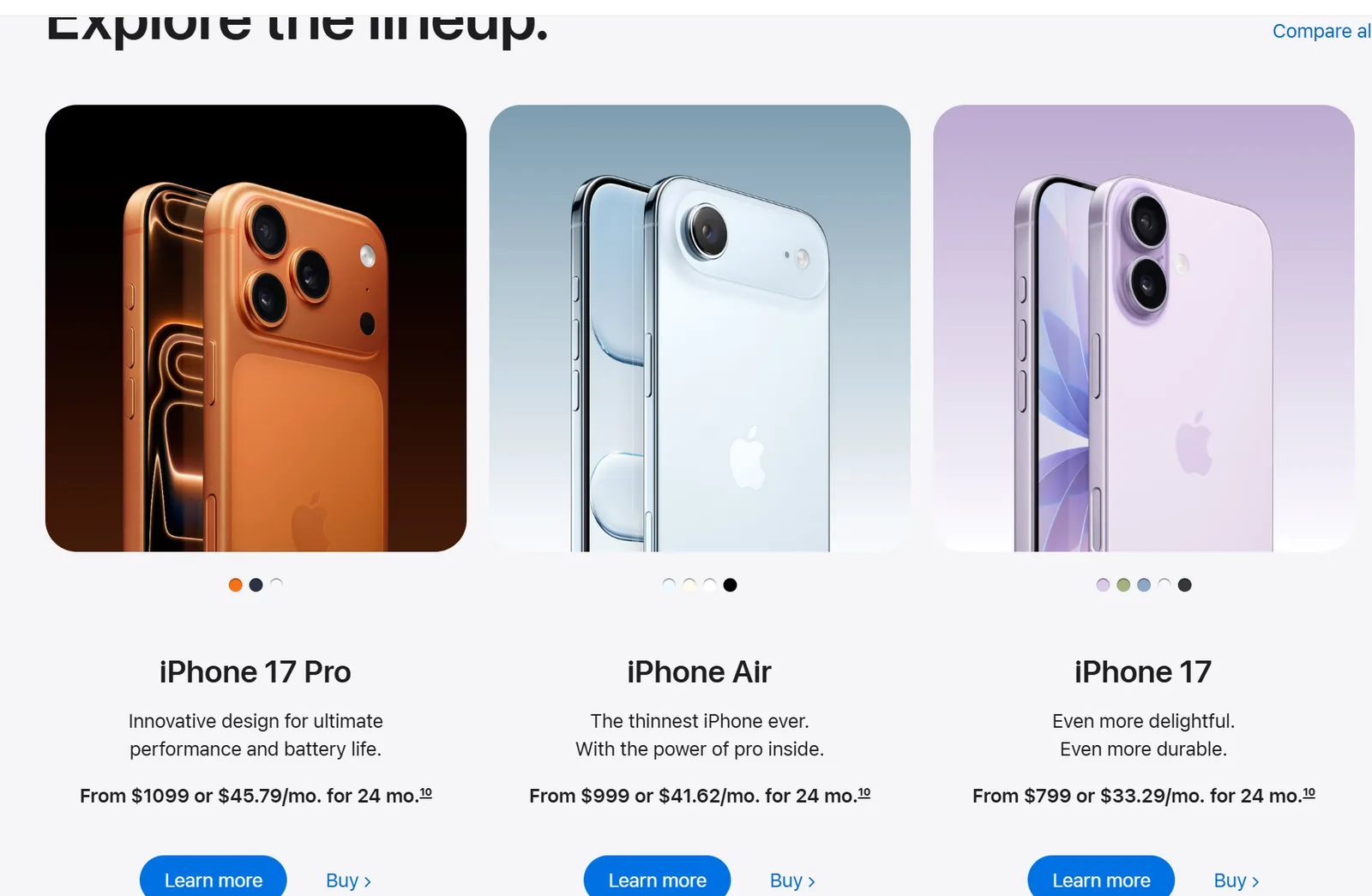
As you can see, this page breaks the iPhone down into several clear modules by specific product, like the iPhone 17 Pro, and below each module is a very short selling-point line plus two action entry points, “Learn more” and “Buy.”
- Use size to tell you to look at the product itself first
First, in the iPhone interface, the product image and product name are the largest visual elements. The first thing the user sees is not the parameter table or legal notes, but the product itself. That is the role of size: “the bigger, the more it looks like the protagonist.”
- Use short copy to tell you what this product is about
As you can see, the copy here, like “The thinnest iPhone,” is very short. It doesn’t stuff all the parameters at you at once; it gives you one core impression first.
- Use grouping to tell you this block belongs to the same product
Putting the product name, selling points, and buttons in the same region makes it natural for the user to understand which information belongs to the iPhone 17 Pro and which belongs to the iPhone 17.
The poorer approach to design is to show all the information and let the user find the key points themselves. The better approach is to show only the most needed information at the current step, deferring the rest for when the user needs it. Progressive disclosure in skills works in much the same way.
3.2 Too Many Choices Slow Things Down
In life, too many choices often make it hard for us to choose; after all, in many situations we can’t have both. This leads to another issue in design: “the user’s decision-making slows down, or they simply don’t choose at all.”
In psychology there is a law called Hick’s law, describing the relationship between reaction time and the number of available options. It’s actually quite simple — Hick’s law is basically saying:
The more options, the more uncertain the information, the slower a person’s decision typically is.
Applied to product design, when a user faces too many equally important options, they first have to compare, understand, and eliminate, and only then decide.
For example, if a page simultaneously has:
- Buy now
- Add to cart
- Favorite
- Compare
- Share
- Compare
- View details
- Claim coupon
- Contact support
- Pay in installments
- Join membership
If all these functions look roughly equally important visually, the user will hesitate.
A better approach is to establish a decision hierarchy:
- Primary action: Buy now
- Secondary action: Add to cart
- Auxiliary actions: Favorite, Compare, Contact support
Many shopping apps’ product pages present things roughly this way, so the user can tell at a glance what the main path is, instead of being held back by a pile of buttons.
IV. The Goal Gradient Effect
The core of the goal gradient effect is: “the closer people are to a goal, the more willing they are to keep investing.” Most people can hardly persevere without positive feedback, which reflects the goal gradient effect. For example, in a gacha game, if you’re one card away from completing the set, you’ll want to keep pulling. And if, while filling in profile information, you’re shown that you’ve already completed 80%, the user is also more willing to fill in the rest.
So often, for interfaces like generation and loading, having only an infinitely spinning circle is actually not a very good design. A better design would show the loading progress, or show what step you’re currently on. Of course, that’s not to say loop-style ones are all bad — for instance, PVZ2’s loading animation is a marigold, where the number of petals changes bit by bit as the progress advances, while overall it remains a circular style.
4.1 Progress Bars
The progress bar is the most common form of the goal gradient effect in design.
When a user enters a game, exports a video, or installs software, a progress bar can clearly tell the user where the current progress is. Compared with a constantly spinning design, it looks more reassuring, more grounded.
For example, a progress bar showing “downloading plugin 72%” is in fact more willing to be waited out than a simple “downloading.”
4.2 Task Checklists
A task checklist is another common application of the goal gradient effect. A large task, if not broken down and thrown whole at the user, is actually rather difficult for the user — take filling in account information. In many banking apps, while filling in account information, the sub-tasks are laid out clearly at the top, like filling in phone number and ID card. This clearly makes the user more willing to act, since with each item completed, the user gains a small sense of completion.
A task checklist can turn large, vague tasks into small, clear forward steps.
4.3 Loading States
Loading states can be divided into several kinds:
Short waits: a simple loading animation can be used, suitable for cases where you only need to wait a few seconds.
Medium waits: tell the user what the system is doing.
Long waits: provide progress, stages, and ideally add an estimated time, or allow the user to leave and get notified later. For instance, with multi-agent processing, I think over 3 minutes counts as a long wait for most users.
V. Microcopy Design
Piled-up earth makes mountains, and wind and rain rise from it; gathered waters make deep pools, and dragons are born in them. Very often, we tend to focus on the big blocks and layout, but easily overlook small details, like fonts or copy.
Jobs once emphasized that even places the user can’t see should be taken seriously. Part of that was influenced by his carpenter father, and it really is a fine quality. Very often, what affects user experience is not necessarily some big business flow or interface layout, but possibly a few words on a button, a hint on a form, a paragraph of explanation on an error, a line of text on an empty page.
These things, easily overlooked by many product managers and developers, are microcopy.
Microcopy is not about making text cuter, nor about tossing in random hints. The role of microcopy is, at critical moments, to help the user understand state, reduce confusion, lower psychological pressure, and guide the user toward the next step.
5.1 Button Copy
A good piece of button copy should answer one question: “what will actually happen after the user clicks?”
So the focus of button copy is not on being short, but on being explicit. Many products’ button copy likes to use words like “OK,” “Submit,” or “Next,” which are suitable in scenarios where the user clearly knows what they’re doing, but sometimes the user doesn’t know what will happen when they click.
For example, with a submit button, what exactly is being submitted? If it’s “Submit application,” then I know — what’s being submitted is the application.
Two more examples:
Bad: OK
Good: Delete project

Bad: Done
Good: Save settings
From this it can be seen that good button copy should try to use an action + object structure, under which the user doesn’t need to over-guess what the button means.
But there is a special case here: for human-care-oriented products, button copy also needs to reduce pressure.
For examples, an ordinary product can say “Start test,” but a psychology-oriented product is better suited to “Get to know yourself” / “Start with one small question”
Because users coming into this kind of human-care product may already carry some negative emotions. If the buttons are too standardized, like an exam or a diagnosis, it’s easy to make the user nervous.
So the button copy of psychology-oriented products should try to avoid:
Assess your psychological problems now
Start diagnosis
Detect abnormal states
A gentler way of writing is:
Check in on how you're doing
Record how you feel in this moment
Start with a one-minute entry
The core of button copy is:
Let the user know what to do, and at the same time not make them feel like they’re being judged.
5.2 Form Hints
The purpose of form hints is to tell the user how to write things before they make a mistake.
For example, a very stiff form might have the following content:
Please enter a nickname
Please enter a phone number
Please enter an introduction
But this creates some problems, such as:
- I fill in the nickname only to find out I need to buy SVIP to change my name, and you didn’t tell me in advance, Cao thief ah…
- I finally write a 1,000-word self-introduction, and then at submission I’m told there’s a 200-character limit, making me wish I could flip a table full of food over.
These problems are all small ones, but if they exist, someone will definitely run into them — after all, for a low-probability event, as long as the number of trials is large enough, unless the probability is 0, you can say it’s a certainty.
Better form hints should, when necessary, supplement format, purpose, and limits.
For example, the one above could be changed to the following:
Your nickname will show on your profile page; it can be changed later / changing it requires SVIP
Please enter an 11-digit phone number, used to receive login verification codes
Please describe how you're feeling, limited to 500 characters
Of course, human-care-oriented products need to be a bit more thorough. The reason I’m bringing this up a second time is that, as I see it, in a downturn era the demand for these kinds of products will definitely rise; people need human care, or mental-health-oriented products.
For example, on a mood-recording page, you could write just one line:
Please describe your moodOr you could be a bit more thoughtful — after all, the user may be under a lot of stress, to the point of not knowing what to write, or how much to write
Right now it may be hard to describe exactly. Writing a few words is fine.Or
It doesn't have to be neatly organized. Just write down whatever comes to mind in this moment.Let the user feel that they are allowed and accepted here
- Allowed to be imperfect
- Allowed to be a little slower
- Allowed to write just a little
5.3 Error Messages: Don’t Just State the Error, Include the Reason Too
Very often, especially when AI large models are writing code, the error information may only show “error” on the front end, without even showing what specifically happened, or, even more simply, just returning a plain “An error occurred.” Developers may still be able to tell what it is, but what about a grade-school kid — they might think they triggered some kind of alarm.
Of course, there are slightly better ones, like:
Invalid xxx parameter
Operation invalid
System busy
Submission failed
These at least sound like human speech. But I wrote everything perfectly well, and suddenly you tell me the submission failed — what kind of logic is that? It only tells the user it failed, without telling the user how to fix it.
For the simplest of these, if the system is busy, remind the user to take a rest and come back later.
File upload failures are usually caused by the size being too large, so tell the user the reason too, and tell them what range they should keep it within.
So as you can see, a good error message should state three things:
What happened?
Why can't it continue?
What can the user do now?
During development, you can display what the programmer should do — for example, a long string of English error messages, which you can read to know how to fix it. If you don’t know, just bring out GPT-5.5, use bug fix, and it’ll patch it up and hand it over to you, though it’s best to review it anyway — who knows what traps it buried. But this stuff really shouldn’t be exposed to the user.
Here we should try to think from the user’s perspective. Moving on to human-care-type products: in the extreme, if the user makes an operational error, you directly tell them, “The content you entered is invalid,” or, even more extreme, imagine the AI writing the code, or the programmer, is heartless, and you directly display: “Whoops, how did you manage to fill even this in wrong?”
This kind of thing obviously triggers the user’s frustration — ugh, how useless am I — or worse: they crawl along the internet cable, or through social engineering, over to where the developer lives and beat them up. Who told you to write it like this, how could you be so inhuman?
5.4 Empty States
Empty states are the place where many products most like to cut corners; for example, many products might write:
No data available
No journal entries yet
No content yet
...
This kind of copy is actually a bit cold. Empty states should be used to convey system status, improve the user’s understanding of the system, and provide a direct path to key tasks, telling the user as much as possible what they can do and how.
For example, if an interface shows “No projects,” the user doesn’t notice the + button in the top-right corner, and wonders: right, I haven’t created one, but where do I go to create it? Better would be: “You haven’t created any projects yet. Click New Project in the top-right corner to start your first one.”
Two more examples:
Bad: No records yet
Good: There are no records here yet. When you're ready, you can write the first sentence.

Bad: No search results
Good: No relevant content found. Try a different keyword.
5.5 Success Feedback: Tell the User Their Effort Has Taken Effect
Most success feedback is “Success,” “Operation completed,” “Completed,” as if to say this stretch of the story is already over.
But these words, while they express state, lack information. The user may also want to know:
What will happen after success? When will the setting take effect? Where has the content been saved? Should I keep going after this?
Better success feedback should tell the user the result and the next step.
For example:
Bad: Saved successfully
Good: Settings saved. They'll take effect the next time you start up.

Bad: Published successfully
Good: Article published. You can view it on your profile page.

Bad: Submitted successfully
Good: Application submitted. We'll notify you of the result within 1–3 business days.
In psychology-oriented products, success feedback can be a bit more encouraging, but don’t get overly sentimental.
For example:
Entry saved.
Thanks for leaving this feeling here.
Or:
Today's entry is complete.
You've taken a small moment for yourself.
This kind of expression is warmer than a simple “Saved successfully,” but it also doesn’t over-promise.
Note: psychology-oriented products should not casually write:
You have conquered anxiety
You're definitely going to get better
Your problem has been solved
These are overly optimistic, and can also bring a sense of unreality. A safer approach is to acknowledge a small step forward:
You completed this entry.
It doesn't mean the problem is solved right away, but it's a beginning.
The core of success feedback is:
Let the user know their actions produced a result, and that this result is safe, understandable, and can be continued.