中文版:如何优化rag的检索效率
If you want to make AI stronger in certain specialized fields, there are generally a few approaches
-
Fine-tune the model directly. The workload and the compute required are fairly large, since it involves touching the model’s internal parameters.
-
RAG
-
The newest solution so far: the GitHub project supermemory. It includes RAG, but it goes beyond RAG. It essentially gives AI a very complete context environment, and it also stores information using graph memory.
This post is mainly about RAG and how to optimize it.
First, RAG. The full name is Retrieval-Augmented Generation, i.e. retrieval-augmented generation.
The simplest way to understand it: turn the user’s input into a vector, then match it against the text vectors in a vector database such as ChromaDB or Qdrant. A vector is something like (x1, x2, x3, …) in form. Vector distance is sometimes computed with plain Euclidean distance, like the formula below, but more often cosine similarity and dot product are used.
That’s the 3D vector distance formula generalized to n dimensions. The closer the distance, the more semantically related the two are. Then you sort by distance from small to large and pick the top N results.
But if we understand it in a bit more detail, why turn it into a vector in the first place?
First, a piece of text, like the input what’s your name, gets cut into individual tokens by the tokenizer, and then each token becomes a token id, such as:
what's -> 30

your -> 70

name -> 65
But this token id is really just an index.
For example, your here corresponds to token id 70, which means go to the embedding table and fetch the vector in row 70.
Here V stands for vocabulary size, i.e. the size of the vocabulary. You can think of it as how many tokens this embedding table has, i.e. how many rows.
D refers to the vector dimension, i.e. how many numbers the corresponding vector has.
Above, your corresponds to token_id 70, so you look for the vector in row 70, and so on. So at the end of the day, token_id is just an index.
Going through this table lookup gives you the initial vector, but it still needs to go through some math before it becomes a vector that carries contextual attention.
But if all you do is look up vectors by token_id, the model itself has no idea about the order of the tokens. So without a position marker, “dog bites man” and “man bites dog” would be exactly the same input to the model. Hence another thing: position_id.
That is, positional encoding.
So the token vector at position i is closer to token vector plus position vector.
Here i indicates which vector it is, i.e. its position.
Then, after Transformer encoding, you get the contextualized token representations:
(each h here is the representation of the i-th word in the overall context)
Finally there’s Pooling. Pooling basically means aggregation: compress many token vectors into a single overall vector. The simplest pooling method is Mean Pooling, i.e. take the average of all the token vectors.
Of course, modern LLMs generally use somewhat more advanced methods. Through this kind of process we get , the vector representation of the query.
In a similar way we can also get the vector representation of a text chunk, , and then run the vector distance computation.
That’s ordinary RAG. But how do you optimize RAG?
Anthropic (what people call “A社”, or “Company A”) proposed a concept in their blog post Introducing Contextual Retrieval: Contextual Retrieval, i.e. contextual retrieval. This post is mainly about this optimization approach.
To know how to optimize it, you first need to know RAG’s shortcomings. For example, RAG can understand semantics, but it has trouble pinning down precise strings, like an error code TS-999, or a class name, a table name, an API path, things that need an exact hit.
Let me first introduce an algorithm: TF-IDF.
TF: Term Frequency. It means that the more often a word appears in a certain chunk, the more important it is.
IDF: Inverse Document Frequency. This one works the other way around: a word that is common in this chunk but rarer across the whole document is more valuable.
BM25 is an improvement on this algorithm.
For a query q and a chunk D, BM25 is usually written as the following formula:
means each word in the query.
-
q: query, the user’s query
-
D: a certain document or a certain chunk
-
t: a certain word in the query
-
f(t,D): how many times the word t appears in document D
-
∣D∣: the length of document D
-
avgdl: the average document length across the whole corpus
-
k1 and b: two hyperparameters, designed by hand in advance
First, this sum is not summing IDF(t); it sums the whole expression that follows, and that whole expression is the score of word t for document D. Each of these words adds some points to the current chunk, and then you sum them all. From this you can see that the more words hit, the higher the current chunk’s score.
Here IDF(t), the inverse document frequency, is equivalent to how valuable the word itself is, while the fraction after it is the match strength of that word in the current document.
Term score = the word’s importance × that word’s match strength in the current document
I. IDF(t)
It measures how rare or not the word is in the corpus.
For example:
-
Words like “the”, “is”, “system”, “problem” are everywhere, so their IDF is low.
-
Words like “TS-999”, “PostgreSQL”, “LoRA” are rarer, so their IDF is high.
A common form of IDF is:
-
N: the total number of documents in the corpus
-
nt: the number of documents containing the word t
If nt is large, it means many documents contain this word, so IDF is small.
If nt is small, it means this word is rare, so IDF is large.
II. The fraction term
2.1 f(t,D), the term frequency
It represents the frequency with which word t appears in document D.
Say a certain query word is Z.
It appears 3 times in a certain chunk.
Then f(z,D) = 3.
But in reality the term frequency here doesn’t grow linearly. There’s a saturation mechanism: the larger the frequency, the score still increases, but more and more slowly.
2.2 Looking at the whole numerator f(t,D)
This one really is a direct multiplication, but wait until you see the denominator and you’ll get it. k1 here is essentially the parameter that adjusts the saturation curve, usually somewhere between 1.2 and 2.0.
2.3 Looking at the denominator
Its job is to keep term frequency from growing without bound, and to take document length into account.
The first piece, f(t,D): as both numerator and denominator grow, the growth eventually slows down.
The second piece:
|D|: the current chunk length
avgdl: the average chunk length of the document
If the ratio is greater than 1, the chunk is on the long side.
This is to prevent long chunks from having a natural advantage. It’s essentially a length normalization, removing the effect of document length.
b:
b here usually takes the value 0.75.
When b = 0, this whole piece becomes 1, so document length is not considered at all.
If b = 1, the length effect is fully turned on, .
If b = 0.75, it’s a kind of compromise.
k1:
k1 controls how the score grows as term frequency increases. If k1 is large, saturation kicks in quickly, since it’s in the denominator after all.
In the end, the essence of BM25 can be compressed to this: a chunk’s score = the importance of each word in the query × its match strength in the chunk, and then you add up those contributions; where the match strength accounts for term-frequency saturation and document-length normalization.
Finally sort by score and take the highest-scoring top K.
Optimization step 1:
Using standard RAG and BM25 respectively, sort by score and pick the top N and top K, then fill them into the LLM’s system prompt. It’s essentially supplementing the model with some information.
Optimization step 2:
Let me first introduce a concept here: prompt cache, i.e. prompt caching. It means that identical or overlapping prompt prefixes, like the system prompt, can reuse prefix processing results computed earlier, i.e. reuse the intermediate states already computed for that prefix. DeepSeek, for instance, has prompt caching enabled by default, though some others need to be turned on manually in code.
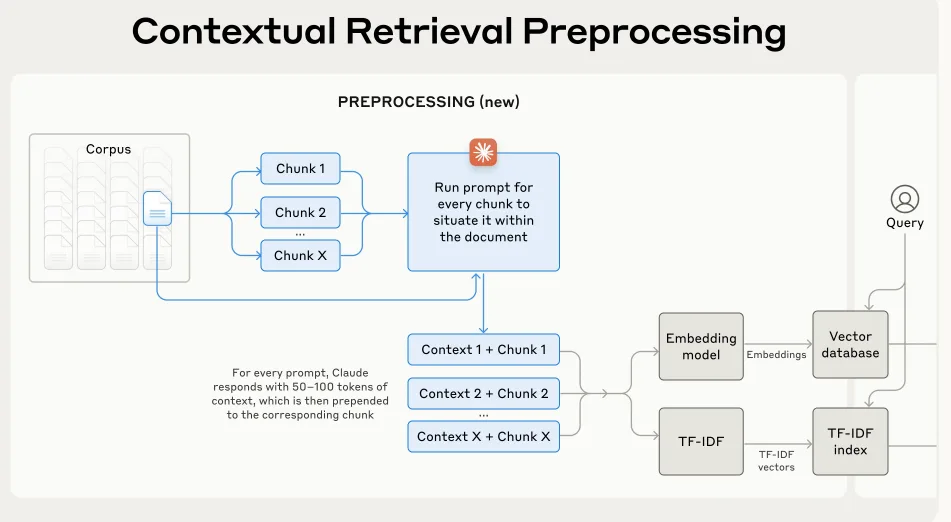
The optimization here is to add a piece of context-based information to each chunk split out in advance. Otherwise the information between chunks is fragmented. For example, you want to query a certain company’s profit in the third quarter, but the match lands on the company’s profit, while “third quarter” is still in some other chunk.
The idea is to give the LLM an optimized prompt containing both the current chunk and the entire document content. Because of the prompt cache, this cuts token consumption by a lot. Otherwise, stuffing the entire document in every time is still too expensive in tokens.
Here is the official prompt Anthropic provides:
<document>
{{WHOLE_DOCUMENT}}
</document>
Here is the chunk we want to situate within the whole document
<chunk>
{{CHUNK_CONTENT}}
</chunk>
Please give a short succinct context to situate this chunk within the overall document for the purposes of improving search retrieval of the chunk. Answer only with the succinct context and nothing else.
Then run BM25 indexing on the chunks with context information added, vectorize them afterward, and store them in the vector database for later queries.
Optimization step 3:
The third optimization is done through a rerank model. What is rerank?
Rerank is a fine-grained re-sorting of all the recalled results.
Earlier, RAG and BM25 already did one round of sorting each: one by vector similarity, the other by literal word matching.
Rerank, on the other hand, puts the query and each chunk together and re-judges them one by one. Rerank requires semantic understanding, so you need a rerank model to do the fine-grained judgment.
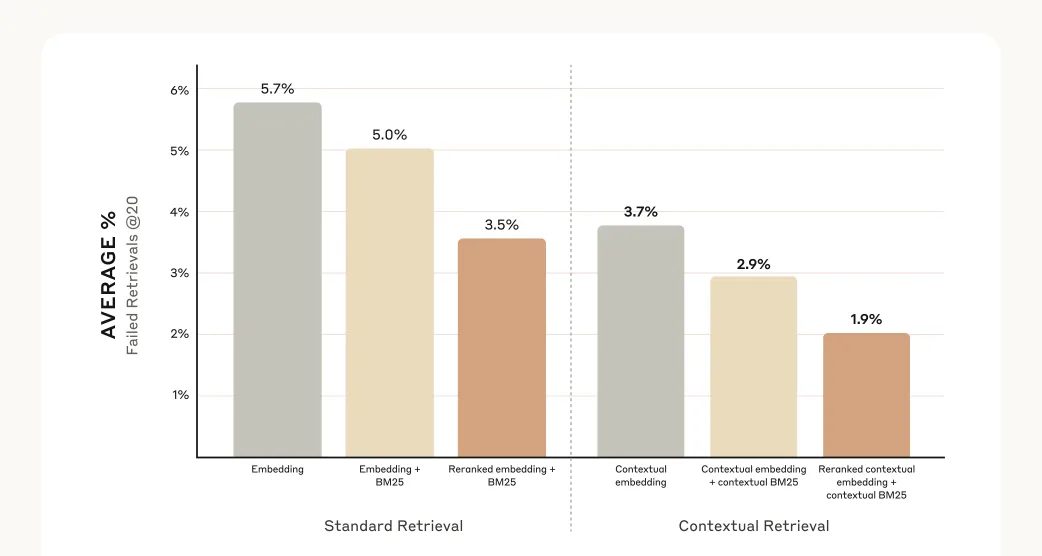
After these three optimizations, RAG’s query failure rate can be reduced by 67% (5.7% -> 1.9%; the data comes from the evaluation in the Anthropic post above).