中文版:Skills的底层原理分析
1. What are skills
1.1 Why we need skills
Before Skills existed, handling complex tasks (like marketing campaign analysis) usually ran into these pain points:
- Repetitive labor: every time you had to copy-paste a long prompt.
- Context pollution: all the background material (benchmarks, rule docs, and so on) got shoved into the context at once, burning tokens and easily confusing the model.
- Dependence on individual experience: the process was hard to standardize and replicate across a team.
Peter Steinberger once said on May 9, 2026, at 12:38
The more skills you give codex,the less you have to prompt.
The more skills you give, the less you have to prompt your agent with, but that doesn’t mean you can just kick back and check out, as Karpathy put it
You can outsource your thinking, but you can’t outsource your understanding.
You can’t outsource your understanding entirely to AI. The judgment calls at key points still need a human to make the decision.
So, more precisely, skills are about packaging up an entire workflow, or even a whole toolkit. They can contain prompts, subagents, MCP servers, and utility scripts, so that the agent can call them automatically based on user intent.
2. The Technical Architecture and File Structure of Skills
2.1 Standard skill structure
A standard skill is a folder, structured like this:
analyzing-marketing-campaign/  (skill root directory)
├── SKILL.md                   (core entry file)
└── references/                (referenced resource folder)
    ├── budget_reallocation_rules.md
    ├── data_quality_checklist.txt
    └── scripts/               (optional: Python/Bash scripts)
2.2 SKILL.md
SKILL.md is the skill’s manual. It must contain a YAML header and Markdown instructions, especially the metadata in the YAML header. Among those, name and description are required fields, and the most important one is still description. It shouldn’t just describe what the skill is; it should also say when to use it. That’s the key to automatic skill triggering.
---
name: analyzing-marketing-campaign # required: skill name (lowercase, hyphen-separated)
description: Analyzes weekly marketing campaign data... # required: the description used to trigger the skill
inputs:
	- file: Excel/CSV,...
outputs:
	- markdown/Excel,...
---
# Instructions1. Read the input CSV data... (task flow)
2. Perform Data Quality Check...
3. If user asks about budget, reference: references/budget_reallocation_rules.md
...
A good description usually contains three parts:
- Capability scope: what this skill can do.
- Trigger scenarios: what the user says or uploads that should trigger its use.
- Boundary conditions: when not to use it, or what needs to be asked first.
2.3 Progressive disclosure
The core of skills is progressive disclosure, which is also what sets it apart from long context.
- Initial state: only
nameanddescriptionexist in the context. - Triggered state: user intent matches the description -> load SKILL.md.
- Execution state: load files from
references/or run scripts on demand, depending on what the instructions need. - Advantage: massively saves tokens, reduces model “hallucination”, and improves response speed.
Honestly, I never used to know how progressive disclosure was actually implemented. At first I assumed it was based on the file structure, that the AI model could only see the outermost folder names…
I have to admit, that was a bit shallow, and it’s completely wrong. That’s a no-no.
The core of skills is progressive disclosure. As for why progressive disclosure is even possible, that’s not actually a capability of the AI itself. It’s the vibe coding tool or agent tool actively probing for skills, not the model magically knowing what’s in the file system.
Take Anthropic’s Claude Code as an example. The official flow is roughly like this
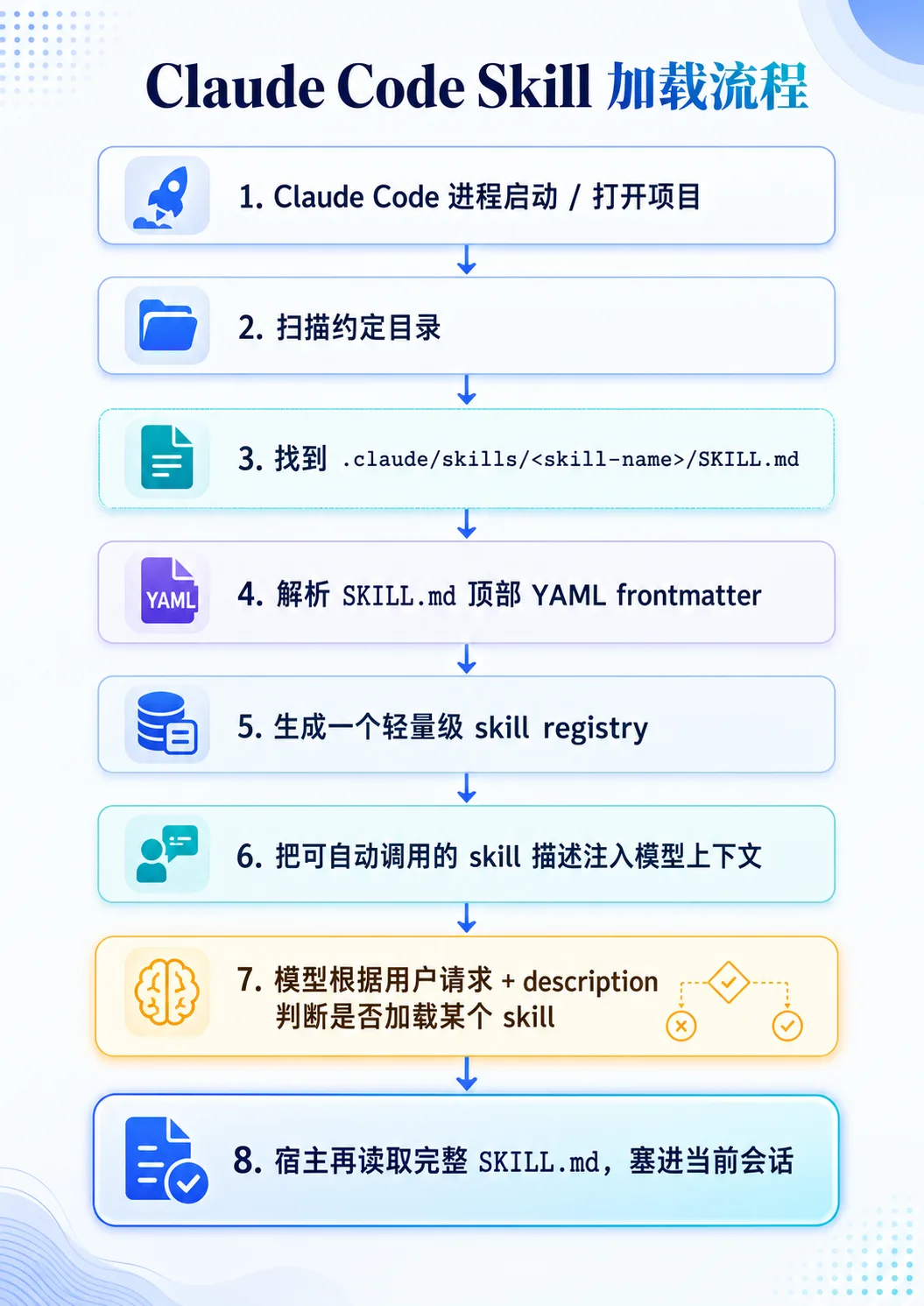
On top of that, a skill can live in personal, project, plugin, or enterprise locations, for example the personal directory ~/.claude/skills//SKILL.md or the project directory .claude/skills//SKILL.md. It also watches those skill directories for changes, so additions, modifications, and deletions take effect in the current session.
The underlying code for this probing is probably something like this:
// Define all the possible source directories where Skills may live
// including user-level, project-level, plugin-level, enterprise-level and other tiers
const skillDirs = [
  "~/.claude/skills",                  // user's personal global Skills directory
  "<project>/.claude/skills",          // Skills directory inside the current project
  "<plugin>/skills",                   // Skills directory shipped by a plugin
  "<enterprise-managed-skills>",       // centrally managed enterprise Skills directory
]

// Iterate over every Skill source directory
for (const dir of skillDirs) {
  // Iterate over every subdirectory under that directory
  // usually each subdirectory represents an independent Skill
  for (const child of listDirectories(dir)) {
    // Build the standard entry file path for the current Skill
    // Anthropic Skills conventionally use SKILL.md as the entry file
    const skillFile = path.join(child, "SKILL.md")

    // Check whether this Skill entry file exists
    // if not, the subdirectory is not a valid Skill
    if (exists(skillFile)) {
      // Read the full content of SKILL.md
      const raw = readFile(skillFile)

      // Parse the YAML frontmatter at the top of the Markdown file
      // frontmatter is the metadata part, e.g. name, description, allowed-tools, etc.
      // body is the body part, i.e. the actual Skill instructions
      const { frontmatter, body } = parseMarkdownWithYaml(raw)

      // Register the parsed Skill information into the registry
      // the registry can be understood as a "skill registry" or "skill index"
      registry.push({
        // Skill name:
        // prefer the name declared in frontmatter
        // if name is absent, fall back to the directory name as the Skill name
        name: frontmatter.name ?? basename(child),

        // Skill description:
        // prefer the description declared in frontmatter
        // if description is absent, fall back to the first paragraph of the body
        // this description is typically used by the model to decide when to invoke the Skill
        description: frontmatter.description ?? firstParagraph(body),

        // Save the real path of SKILL.md
        // after the model decides to hit this Skill, the host can load the full body via this path
        path: skillFile,

        // Whether the model is allowed to invoke this Skill automatically:
        // if frontmatter explicitly sets disable-model-invocation: true,
        // automatic invocation is disallowed;
        // otherwise automatic invocation is allowed by default
        autoInvocable: frontmatter["disable-model-invocation"] !== true,
      })
    }
  }
}
What actually gets filled into the prompt is just that metadata, roughly like the following
Available skills:
- frontend-design: Create distinctive production-grade frontend interfaces...
- pdf-processing: Extract text and tables from PDF files...
- summarize-changes: Summarizes uncommitted changes and flags risky edits...
The model then requests the full skills to be loaded as needed.
Roughly a three-layer progression like this.
Anthropic officially splits it into three layers: Level 1 is metadata, always loaded at startup; Level 2 is the SKILL.md body, loaded once the task matches; Level 3 is resource files and scripts, read or executed only when needed.
One more thing to add: a lot of the time you don’t need to write out the entire skill yourself. You just describe your requirements and steps to your agent, and it can build the skills you need for you. You can even take an article you’ve read or a way of thinking and have a large model summarize it into a skill.