Introduction
Whenever I’m vibe coding, or listening to people in group chats talk about tech, I keep running into phrases like “auth” and “constructing a request”. Most people have come across fields like auth, token, sign, and Authorization to one degree or another, but few have stopped to think about what these identity-verification fields are actually for.
Really, identity verification has only ever been about one thing from start to finish: why should the server believe this request?
1. Why the server can’t directly trust a request
1.1 HTTP requests are inherently untrustworthy
An HTTP request is essentially a piece of data the client can construct. The client can say whatever it wants about what it’s doing, where it is, and what permissions it has, but none of that means the server has to believe it, because requests can be forged, causing problems like privilege escalation. They can also be tampered with, and old requests can be replayed, leading to things like email bombing.
From this come three questions:
- Who sent this request?
- Has this request been modified?
- Does this user actually have permission to do this thing?
A typical HTTP request looks something like:
POST /api/checkin
Host: example.com
Content-Type: application/json

{
  "latitude": 29.56,
  "longitude": 106.55
}
So the question is:
- Why should the server believe this request came from you?
- Why should it believe the location inside hasn’t been changed?
- Why should it believe this isn’t someone replaying a copy of one of your earlier requests?
2. What is Auth
2.1 What auth is
Let’s distinguish three terms here
Authentication: proving who you are
Authorization: deciding what you're allowed to do
Access Control: the system concretely executing a block or a pass-through
Auth generally refers to the abbreviation of authentication: it’s a layer of identity proof wrapped around the outside of ordinary business data.
2.2 The most common forms of Auth: token, session, cookie
2.2.1 token
Generally, after you log in to a website successfully, the server gives you a token. A token can be understood as a temporary ticket, or as a kind of identity credential. When calling endpoints you don’t have to type in your username and password every time; you just bring the token.
Lots of agent skills also manipulate a user’s applications through a token or cookie.
POST /api/profile
Authorization: Bearer <access_token>
So it’s fairly dangerous for a token to leak.
2.2.2 cookie
A token is an identity credential, while a cookie is one way of storing and carrying it. Of course a token can perfectly well live outside a cookie; the most common approach is front-end code putting it directly into the request headers.
2.2.3 session
A session is server-side session state. A “session” is the temporary identity profile the server builds for one user’s continuous sequence of visits over a stretch of time. After a successful login, the server creates a session record in its own database or cache.
session_id = abc123
user_id = 10086
expires_at = ...
The server then generally puts the session_id into the browser’s Cookie.
Cookie: session_id=abc123From then on, every request the browser makes automatically carries the Cookie, and the server uses the session_id to look up who you are.
So why can a cookie save you from logging in?
Essentially it’s not the cookie itself that logs you in, but because the Cookie holds a credential, such as session_id, which the server can use to find you.
3. What timestamp and nonce are for
A signature alone isn’t actually enough, because someone might capture one legitimate request and then send it again exactly as-is, or even just keep firing it with a script.
So a request will generally also include
timestamp: timestamp
nonce: one-time random number
The timestamp indicates the time at which a given request was generated. Its job is to let the server judge whether the request is too old.
For example, the back end might stipulate that it only accepts requests generated within the last 5 minutes. After receiving a request, the server will compare
current server time - the request’s timestamp <= 5min
and reject anything over 5 minutes old.
A nonce, meanwhile, is a random number that is only used once. If the same nonce shows up again, the server rejects it.
4. What JWT is
JWT is a structured token, usually composed of three parts: Header, payload, and signature. So the form you normally see is xxx.xxx.xxxx. Its focus is not encryption, but signing.
JWT stands for JSON Web Token. You can understand it as a kind of token that carries a signature, is structured, and can be verified by the server.
An example of what a JWT looks like:
eyJhbGciOiJIUzI1NiIsInR5cCI6IkpXVCJ9
.
eyJ1c2VySWQiOjEwMDg2LCJyb2xlIjoic3R1ZGVudCIsImV4cCI6MTcxNTAwMDAwMH0
.
abc123signature
Which is just Header.Payload.Signature, that is, header.payload.signature.
4.1 Header: explains how the token is signed
The header usually looks like this:
{
  "alg": "HS256",
  "typ": "JWT"
}
alg is the signing algorithm, such as HS256 or RS256.
typ is the type; here it’s JWT. This is where the server is told which algorithm was used to generate this JWT’s signature.
4.2 Payload: where the real identity information lives
The payload, also called Claims, holds the claim information.
For example:
{
  "userId": 10086,
  "username": "sunmingrui",
  "role": "student",
  "exp": 1715000000
}
One thing to note, though: the payload is not a secure hiding spot. It’s usually only Base64url-encoded, and anyone can decode it and read it.
So a JWT should not hold sensitive information like passwords, ID card numbers, phone numbers, or keys.
4.3 Signature: the soul of the JWT
Signature means the signature.
Its role is not encryption, but preventing the Header and payload from being tampered with.
Roughly, it’s generated like this:
signature = HMACSHA256(
  base64UrlEncode(header) + "." + base64UrlEncode(payload),
  secret
)
So the JWT flow is this: the server takes the Header + payload + secret key, computes a signature, and then snaps them together like Lego bricks into
Header.Payload.Signature
After the client gets the JWT, it sends it along with every request.
Authorization: Bearer <jwt>Once the server receives the JWT, it recalculates the signature, then verifies whether the signature matches.
So essentially a JWT isn’t encryption, it’s signing. The header and payload are both base64url-encoded, and anyone can decode them in no time flat.
The point is that although others can see the contents, they can’t modify them.
5. OAuth 2.0 and OIDC: the authorization and authentication behind third-party login
Let’s set up a scenario first. Say you’re logging into ChatGPT, and you generally choose to log in with Google.
The ChatGPT website will never ask you for your Google account’s username and password. Instead it redirects you to Google’s interface, where you log in and authorize, and the GPT website creates or logs in a local account based on the information Google returns.
So this is the basic idea behind third-party login: the user doesn’t hand their password over to the third-party app, but instead has a trusted identity provider issue a credential.
5.1 OAuth2.0
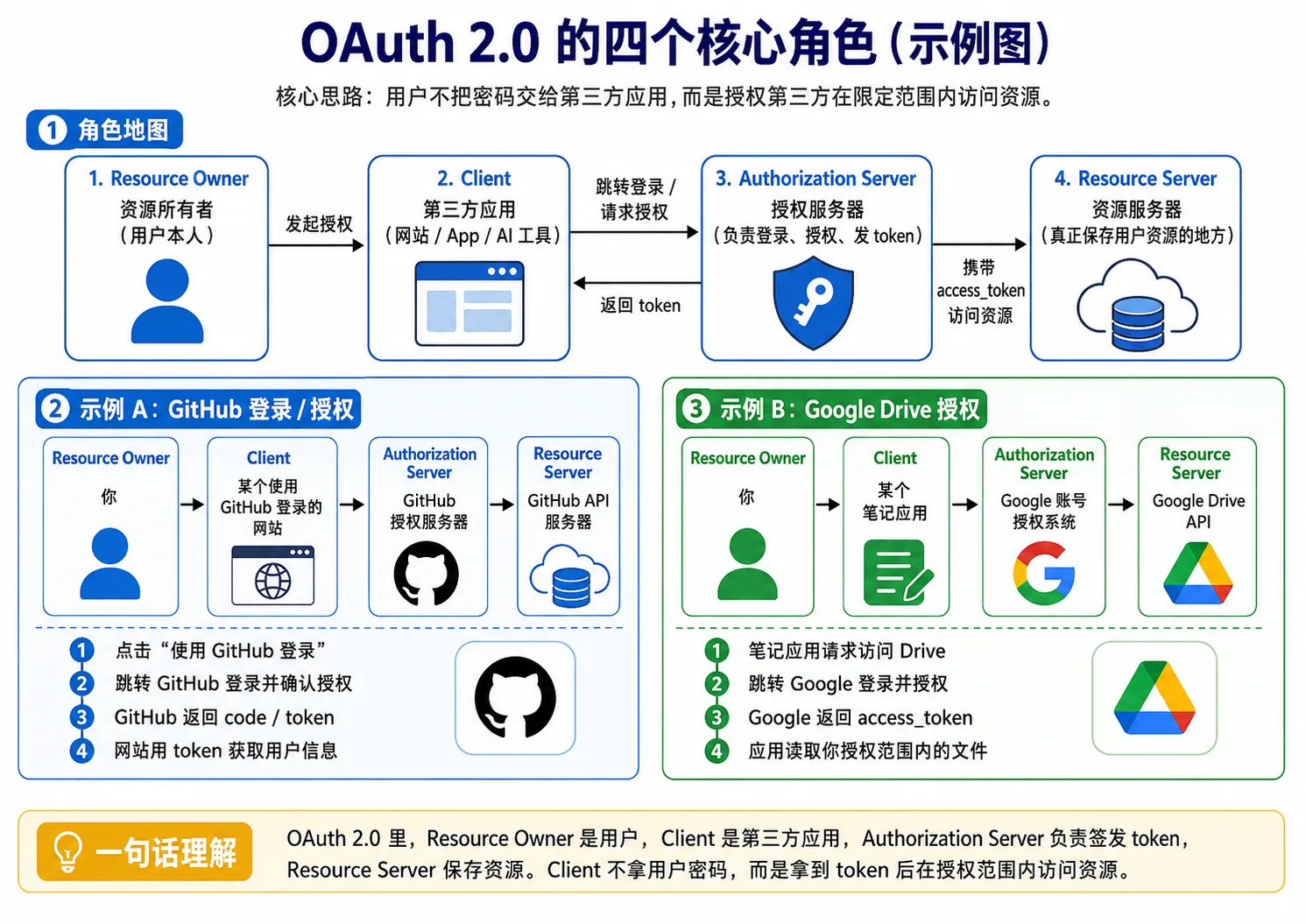
OAuth2.0 solves the problem of a user authorizing a third-party platform to access part of a resource on one of their own platforms. For example, when you use Notion to connect to your Google Drive, what Notion wants to do is read your Google Drive files, create new documents, and that sort of thing.
OAuth2.0’s approach is:
You confirm the authorization on Google's official page
↓
Google gives this application an access_token
↓
The application uses the access_token to access resources within the allowed scope
The key point: what OAuth2.0 gives the third-party application is an access_token, not the user’s password.
The access_token here can be understood as a temporary pass for the third-party application to access the user’s resources. It generally comes with a permission scope, that is, a scope.
The typical OAuth2.0 flow:
The user clicks "Log in with GitHub"
↓
The website redirects the user to GitHub's authorization page
↓
The user logs in on GitHub's page and confirms the authorization
↓
GitHub redirects back to the website with an authorization code
↓
The website's back end takes the authorization code to GitHub to exchange it for an access_token
↓
The website uses the access_token to request the GitHub API
↓
GitHub returns the user information
↓
The website completes the login or registration based on the GitHub user information
There’s actually an intermediate product here: the authorization code.
It functions as a temporary authorization code; the website’s back end takes this code to exchange for the real access_token.
As for why it doesn’t return the access token directly, there are a couple of problems:
- The URL might be recorded by the browser history, logs, or proxy servers
- Exposing the token directly is riskier
So the safer approach is:
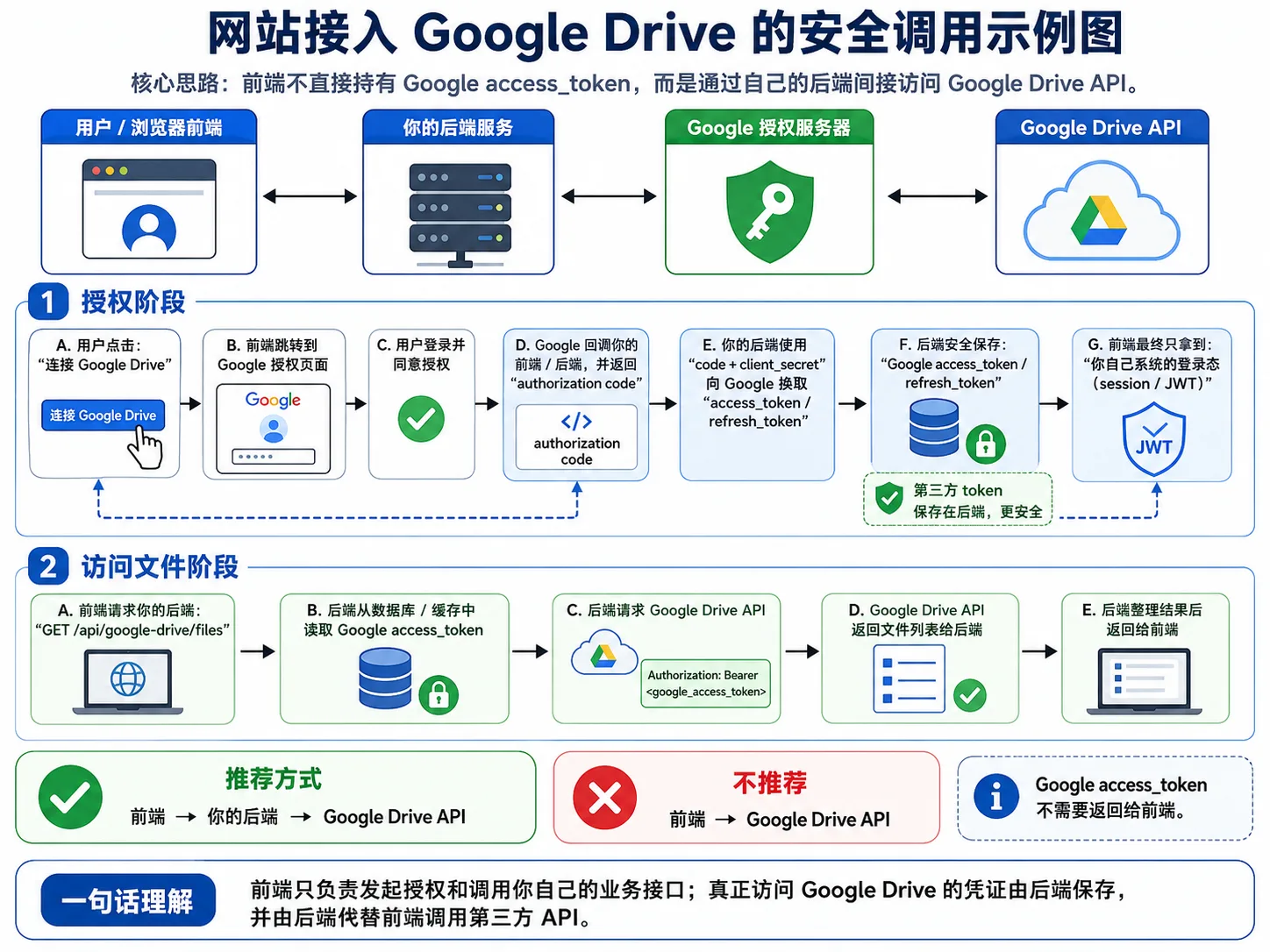
The front end only gets the code, and the back end uses code + client_secret to exchange it for the access_token, so it isn’t exposed directly to the browser.
And it isn’t returned to the front end afterwards either; it’s stored in the back end’s database or cache. From the front end’s perspective, it just holds the login state, while the back end handles making the calls. Just like when calling an LLM, it’s generally the back end that constructs the request and calls the official API.
5.2 OIDC
OIDC: OpenID Connect
Built on top of OAuth2.0
OAuth 2.0 is concerned with whether I can access your resources
OIDC solves how a third-party application confirms who the current user is
So OIDC adds an id_token on top of OAuth 2.0.
Although, generally speaking, every user’s Access_token is also different, the Access Token is there for the Resource Server to look at, not for the Client to look at as an ID card.
In OAuth 2.0:
The main recipient of the access_token: Resource Server
Purpose: accessing API resources
For example:
GET /user/repos
Authorization: Bearer <access_token>
After the GitHub API sees this token, it will judge:
Is this token valid?
Does it have read:user permission?
Can it read this user's data?
What it answers is:
Can this application access certain resources on behalf of the user?
And not:
What is this user’s standard identity information?
Also, the Access_token generally can’t be decoded the way a JWT can. Once a third-party application gets hold of one, it can’t extract user_id or other information from it at all.
5.2.1 id_token
An id_token is usually a JWT, and inside it contains user identity claims, such as
{
  "sub": "123456789",
  "name": "SMR",
  "email": "xxx@example.com",
  "iss": "https://accounts.google.com",
  "aud": "your-client-id",
  "exp": 1715000000
}
The more important fields here:
sub: the user's unique ID at the identity provider
iss: who issued this token
aud: which application this token is issued to
exp: expiration time
6. Summary
Back to the original question: “Why should the server believe this request?” The answer is nothing more than a chain of evidence added on step by step. The token proves who you are, the signature proves the request wasn’t modified, the timestamp and nonce prove this isn’t an old request, OAuth 2.0 lets you authorize resources to a third party without handing over your password, and OIDC finally lets a third party be certain “who you actually are”. Every link in the chain fills in another pit dug by HTTP’s inherent untrustworthiness.
Always remember a few key points:
- Don’t expose tokens in front-end logs
- Don’t put sensitive data in JWTs
- Don’t do signature verification on the front end
- The shorter the expiration time, the better